
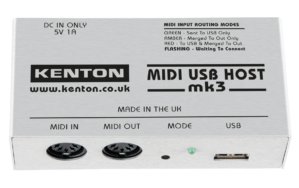


MIDI USB Host mk3
USB Host to MIDI converter for ‘Class Compliant’ USB MIDI Devices
£78.90 ex VAT
£94.68 inc VAT
Description
The Kenton MIDI USB Host is a standalone USB to DIN MIDI converter that can connect your class-compliant USB MIDI devices to 5 pin DIN MIDI without the use of a computer. Perfect if you want to go DAWless, or need your USB gear on the road.
It converts DIN MIDI to USB MIDI in both directions simultaneously, and provides the USB Host capability that is normally provided by your PC, Mac or iPad. With its supplied 5V multi-region mains adapter, it can also supply up to 900mA to power your USB device.
You can connect up to 4 USB MIDI devices via a USB Hub and convert to DIN MIDI. It can also merge data from USB and 5 pin DIN MIDI and copy DIN MIDI data to USB so you can integrate your USB MIDI devices into a DIN MIDI setup.
Page Contents
- Connecting a USB MIDI Device to 5 pin DIN MIDI
- Connecting Multiple USB MIDI Devices to 5 pin DIN MIDI
- Connecting USB MIDI devices together
- Merging USB MIDI and 5 pin DIN MIDI
- MIDI USB Host Compatibility
- MIDI USB Host Specifications
Connecting a USB MIDI Device to 5 pin DIN MIDI
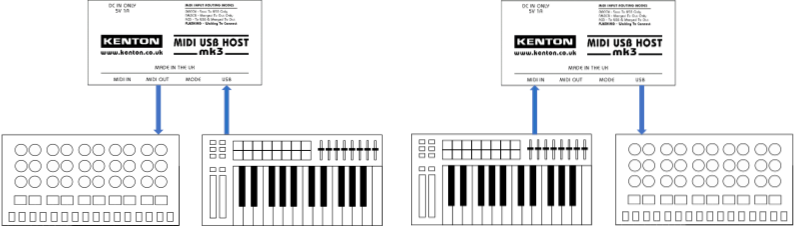
Connect your USB MIDI device to the Type A USB socket, and MIDI data that is received from the MIDI IN socket will be sent to USB, and MIDI data received from USB will be sent to the MIDI OUT socket, allowing you to integrate your USB controllers with your MIDI gear or hook up your 5 pin DIN MIDI controller to a USB synth.
If you have multiple DIN MIDI devices to connect, you can add MIDI Merge and/or MIDI Thru boxes.
Connecting Multiple USB MIDI Devices to 5 pin DIN MIDI
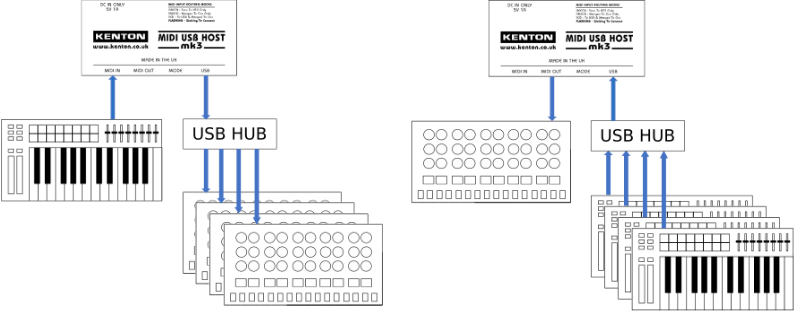
The good news is that the MIDI USB Host supports up to 4 USB devices via a USB hub.
While the 900mA that the MIDI USB Host provides is plenty for most USB MIDI devices, we would recommend using a powered USB hub.
If you have multiple DIN MIDI devices to connect, you can add MIDI Merge and/or MIDI Thru boxes.
Connecting USB MIDI devices together
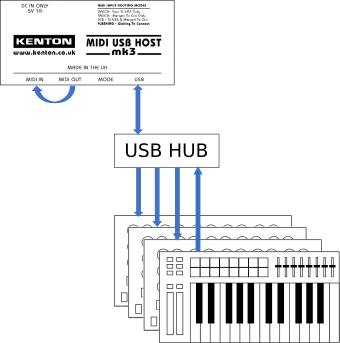
If you only have USB MIDI devices, you can link the USB MIDI Host’s MIDI IN and MIDI OUT with a short MIDI lead, and now those USB MIDI devices can see each other.
So if you have, for example, 1 USB MIDI controller and 3 USB synths, you are good to go!
Note: Some USB synths (eg Roland S-1) always echo MIDI received on their USB port back out again, resulting in a MIDI loop. These are not suitable for use with the MIDI USB Host in this fashion.
Merging USB MIDI and 5 pin DIN MIDI
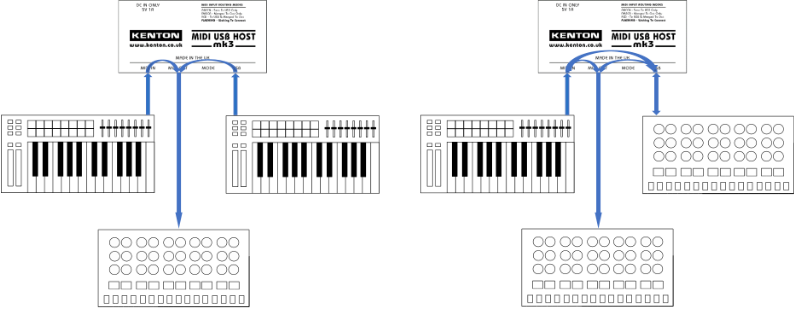
In addition to its standard mode, the MIDI USB Host also has 2 merge modes that combine MIDI from 5 pin DIN and USB, allowing you to integrate USB MIDI controllers and synths with a 5 pin DIN MIDI setup.
Merge mode 1 sends the MIDI from the MIDI IN and from USB to MIDI OUT, so you can pay your synths with both 5 pin MIDI controllers and USB MIDI controllers.
Merge mode 2 does the same as merge mode 1, but additionally sends the data received at MIDI IN to USB – so if you have USB and 5 pin DIN MIDI synths, they can all be included in your setup.
And yes, both of these modes work with up to 4 USB devices via a USB hub.
Note: The merge functionality provided doesn’t handle multiple clock, active sensing or sysex sources in the same way as our intelligent Merge boxes. If you need to handle multiple clock sources, use our MIDI Merge instead.
If you have multiple DIN MIDI devices to connect, you can add MIDI Merge and/or MIDI Thru boxes.
Compatibility
What is class compliance
USB devices are said to be “class-compliant” if they comply with the rules laid down by the USB forum for class-compliance. However some USB devices exploit instances where the implementation in Host computers exceed the specification for class compliance, but it then means these devices are then not truly class compliant.
Other common problems with class-compliance of USB devices are:
1) They use interrupt transfers where the spec requires bulk transfers (the MIDI USB Host can cope with this)
2) Their USB descriptors contain errors (the MIDI USB Host can cope with some instances of this too)
As a rule of thumb, if the USB MIDI device requires a device driver to work, then it is not class-compliant. Some devices need drivers installed in order to send Audio to the computer, but still don’t need drivers for MIDI – these will be fine with the MIDI USB Host.
If in doubt, please contact us.
What is a USB host?
USB requires one (and only one) USB host that initiates communications to one or more USB devices. Usually, your PC, Mac or iPad carry is the USB host, while mice, keyboards, printers and USB synths are USB devices. The MIDI USB Host is a USB Host, so it can initiate communications with your USB MIDI devices, removing the need for a PC, Mac or iPad.
Can I use MIDI USB Host connect 5 pin MIDI devices to my PC, Mac or iPad’s USB port?
USB requires one (and only one) USB host that initiates communications to one or more USB devices. As the PC, Mac or iPad is a USB Host, and the MIDI USB Host is also a USB Host, you cannot connect the MIDI USB Host to your PC, Mac or iPad. What you need to do this is a USB MIDI Interface, or an audio interface that also has 5 pin DIN MIDI.
Known Issues
Most USB MIDI devices launched since 2012 are class-compliant, however there are known issues with the following:
- BOSS – many BOSS products are NOT class-compliant – contact us to check.
- Korg SQ-1 – not currently compatible with the MIDI USB Host.
- Novation Launchpad Mini mk3 – can send MIDI from the Launchpad, but cannot receive MIDI.
- Novation Launchkey Mini mk3 – can send MIDI from the Launchkey, but cannot receive MIDI.
- Roland Boutique range – these are not USB Class compliant, so not compatible with the MIDI USB Host.
- Roland SH-4d – this has a class-compliant mode which should work with the MIDI USB Host.
Specification
| Power Supply: | Power via USB mini-B socket (Power Supply included) |
| Current Draw: | 90mA, leaving 910 mA for USB bus power |
| Connectors: | USB Type A: USB MIDI USB Mini-B: Power 2 x 5 pin DIN: MIDI IN, MIDI OUT |
| Push Buttons: | Recessed push button to change between modes |
| LEDs: | 3 colour LED to signify mode (red, amber, green) or awaiting connection of USB device (flashing) |
| Dimensions: | 110 x 55 x 32 mm |
| Weight: | 100g (excluding power supply) |
| Accessories included: | User Manual 5V 1A Multi-Region Power Supply (suitable for use in the UK, EU, US/Canada and AUS/NZ.) 1.8m USB Type A to Mini-B cable for Power Supply |
Associated products

Manuals
Images

Download USB Host Front
Download USB Host II Main
Download USB Host Obl
Download USB Host Rear
Download USB Host Side
Download USB Host Top


